
Enosis beside your billing, class and gym software
Keep your billing software, and your gym or class system if you have one. Enosis holds what happens with each client: sessions, notes, tests and workouts, and the client's own app.
- Free during the beta
- Italian, German and English
- Hosted in Germany
What stays where
In your software
- Invoices and insurance billing
- Your billing software, such as THEORG, Cenplex or, in Italy, a gestionale for your practice. Invoicing for professionals in Italy is coming. Until then, invoice from the software you use today.
- Memberships, passes and payments
- Your gym or class system, such as Eversports. Enosis takes no payments.
- Class timetables
- Your class system.
In Enosis
- Sessions, notes and the body chart
- One record per client, typed on your phone or laptop.
- Workouts and the client app
- Where the client follows the plan and sees their progress.
- Tests and device results
- From the files VALD ForceDecks, Tindeq Progressor 200 and Scaneca 3D export, or by hand.
- Appointments
- Booked from your public link or by you.
Running the two side by side
Add the client in Enosis
Enosis has no connection to your billing or class system, so a new client is added in each. In Enosis that is the name and contact details, and the rest builds up session by session.
Do the work in Enosis
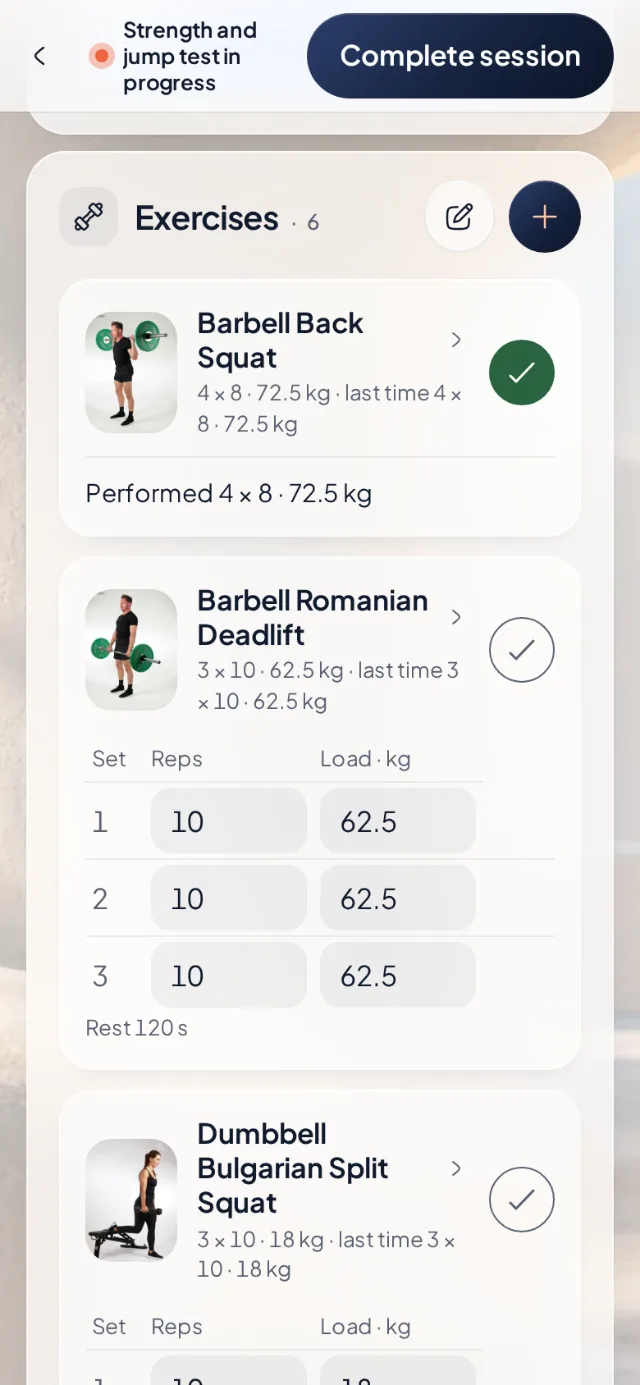
A session in Enosis, on the phone. Sessions, notes and tests go on the client's record in Enosis, and the client follows the plan in their own app.
More about workoutsInvoice where you invoice today
Send invoices from your billing software, as you do now. Enosis does not bill health insurers.
What it does
Every client's record
Sessions, notes, body chart, tests, workouts, files, photos and questionnaires, whether the client comes for therapy or training.
Results from your devices
The files three devices export are added to the same record after you confirm them.
One client or the whole studio, exported
The studio owner exports one client from that client's page, or the whole studio from Settings. It is a ZIP: one JSON file holding every record, plus the original files. You can still ask for it within 30 days after you leave.
Google Calendar
Optional: Enosis writes its sessions to a calendar of its own, with initials only.
What it does not do
One practitioner per studio
During the beta a studio has one login. Several practitioners, roles and a front desk are coming.
No link to other systems
There is no sync with your billing, class or gym software. Each keeps its own client list.
No payments or memberships
Enosis takes no payments and sells no passes.
Goes with
Online booking
One link where clients pick a time, with email reminders.
Questionnaires
Your intake form, answered with the client in the session.
Questions
Do I have to give up my practice software?
No. Keep it for billing, and for classes or memberships if it runs them. Enosis holds the sessions, notes, tests and workouts beside it.
Can you bring my records over from my old software?
Yes, as a pilot, one studio at a time. We turn the old software's files into clients, sessions, notes and workouts in Enosis. Nothing is imported until you approve it, and an import can be undone for 30 days.
What does it cost, and can I leave?
The beta is free, there is no minimum term, and nothing renews by itself. You can leave at any time at no cost. The price of the paid version is not set yet. When the beta ends and the paid version starts, we tell you two weeks before.
Where is my clients' data kept?
On a server in Germany, with encrypted backups in France; every sub-processor is in the European Union. Each file is encrypted on its own, and you sign in without a password, with an email code, a passkey or Google.
Product names belong to their owners. Enosis is not affiliated with or endorsed by them.
Request beta access
Enosis is free during the beta, and studios join by invitation. Leave your email to ask for an invitation.
Already invited? Log in