
Physiotherapy software that keeps tests and home exercises on the client's record
Enosis is physiotherapy software with one record per client: their sessions, notes, body chart, tests and exercises. They do the exercises at home in their own app, and the results from your force plate or force gauge are added to the same record.
- Free during the beta
- Italian, German and English
- Hosted in Germany
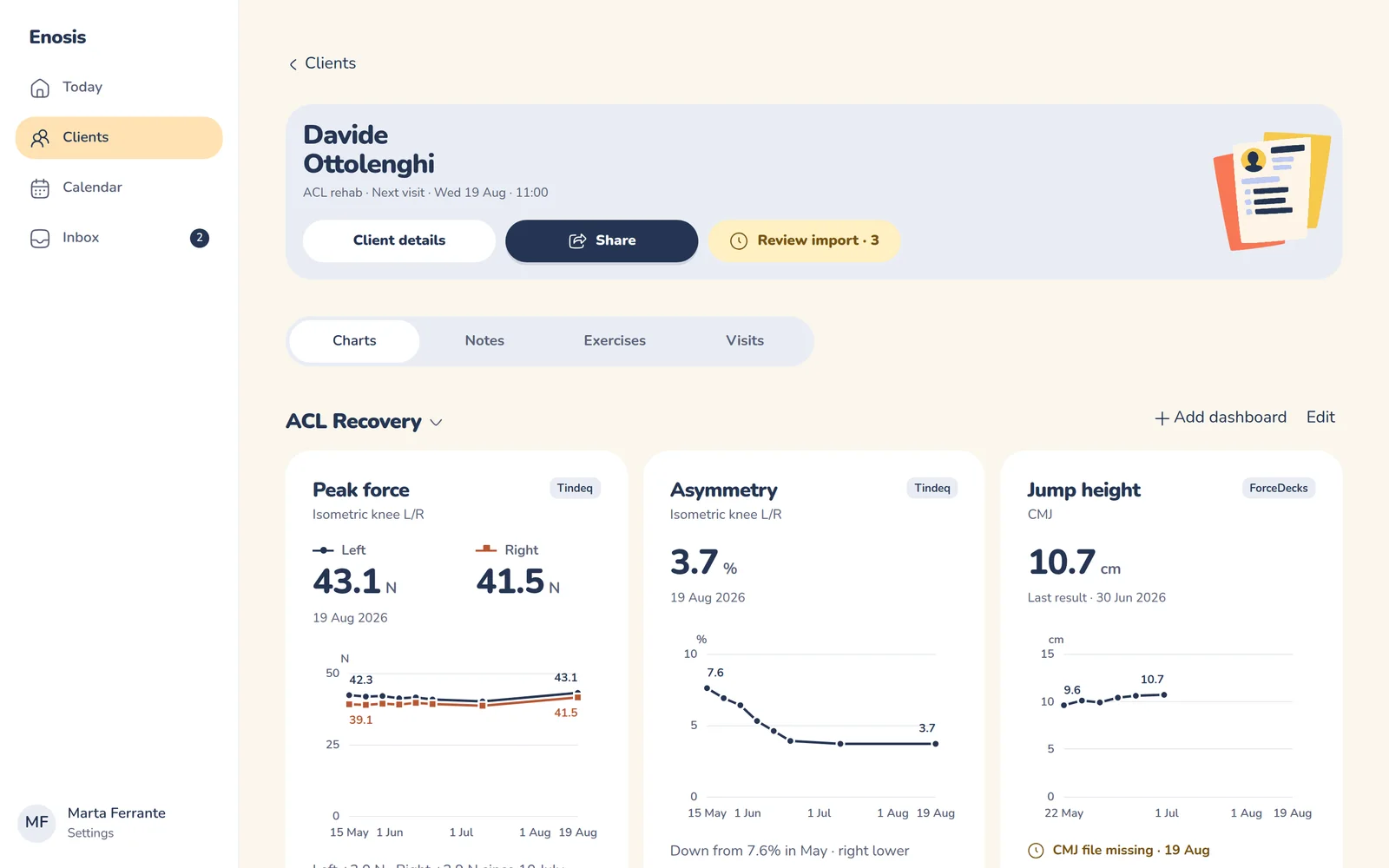
A client's weeks in your practice
They book
The client books a free time on your practice's link, or you book it for them in the calendar. By default a reminder email goes out 24 hours before, with nothing clinical in it.
The initial assessment
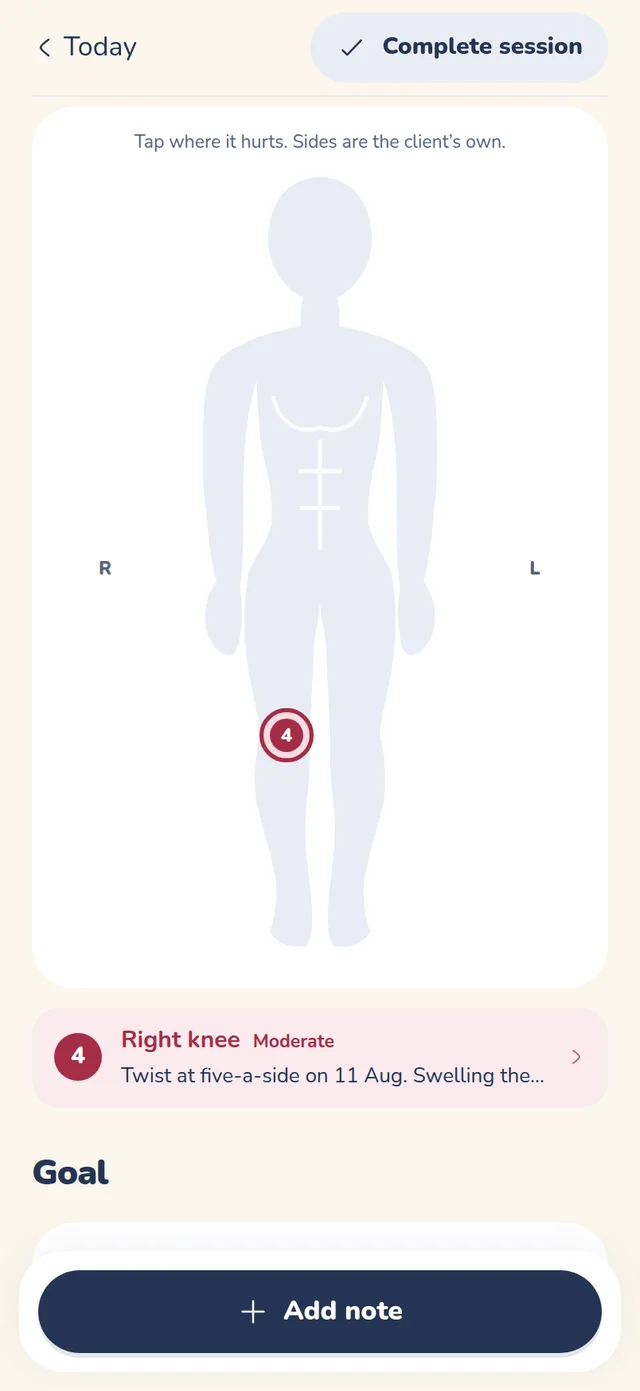
Start the session from Today on your phone, and it keeps its start and end time. Its session type sets what is on the screen: the tests, the exercises, a questionnaire. Mark where it hurts on the body chart and rate it, and the next visit shows how that changed.
The test
Run the jump on the force plate or the pull on the force gauge as you always do, then upload the export or share it from your phone. You check the client and the session before the result is kept. Any other test, including orthopaedic tests, you enter by hand.
The devices Enosis readsThe note
Type the note on your phone during the session, with the client in front of you. It saves as you type, every change is kept as a revision, and the note reaches the client's app only if you mark it visible to them.
The exercises at home
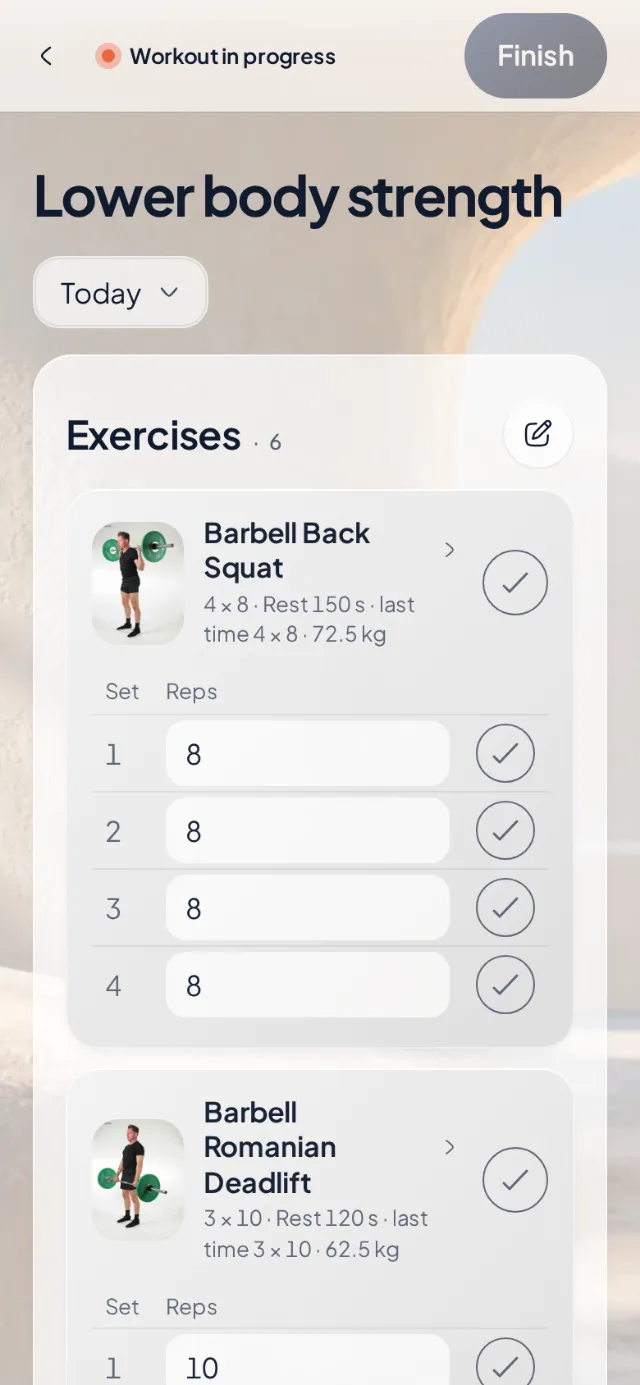
Give the client the exercises you showed them, as a workout in their own app. Where a fixed number of reps would be wrong, write a range. The days they log at home show in your charts.
The follow-up
Open the client's charts: left against right, with the gap between the sides written out and the change since the first test as a number. Show them on your phone, or send a PDF with your practice's name and logo from your own email or messenger.
How the charts work
Your measurement devices
Nothing connects live. You upload the file your device's software exports, and confirm what Enosis read from it.
VALD ForceDecks
Read by fileHannelore Grünstäudl-
Countermovement Jump-2026.11.10.xlsx Jumps, hops and isometric tests, eleven types, from the Trial Series Results and Test Results exports.
Tindeq Progressor 200
Read by filepeakforce_
data_ left_ right_10_11_2026.csv Left and right peak force from the peak-force CSV.
Scaneca 3D
Read by fileVergleichsbericht.pdf
The German comparison report of two scans, as a PDF.
Handheld dynamometers, grip testers, other force plates
By handFor a device not listed here, such as an Activbody ActivForce or a Kinvent, enter the result by hand on the session, left and right with up to ten attempts, and tell us what you use.
What is not there yet
One practitioner per studio
During the beta a studio has one login. Several practitioners, roles and a front desk are coming.
No invoicing yet
Invoicing for professionals in Italy is coming. Until then, invoice from the software you use today.
No insurance billing
Enosis does not bill health insurers. Keep the software you bill with; the sessions, tests and workouts live in Enosis beside it.
No intake form before the first visit
Clients cannot fill in the intake form at home. You go through it with them at the first visit.
Questions
Do my clients need to download an app?
No. The link to your practice opens in their phone's browser, and they can keep it on the home screen under your practice's name.
Where is my clients' data kept?
On a server in Germany, with encrypted backups in France; every sub-processor is in the European Union. Each file is encrypted on its own, and you sign in without a password, with an email code, a passkey or Google.
Which languages is it in?
Italian, German and English, for you and for your clients. Each person picks their own, whatever the studio's country.
Can I bring my records from my old software?
It is a pilot, run one practice at a time. Tell us which software you use today when you request access. Nothing comes over until you have looked at each item and said yes.
What happens when therapy ends and the client keeps training with us?
They keep the same record. A client has one record whatever they come for, so the tests and notes from therapy stay beside the workouts that follow.
What does it cost, and can I leave?
The beta is free, there is no minimum term, and nothing renews by itself. You can leave at any time at no cost. The price of the paid version is not set yet. When the beta ends and the paid version starts, we tell you two weeks before.
Can I get my data out?
Yes. The studio owner exports one client from that client's page, or the whole studio from Settings. It is a ZIP: one JSON file holding every record, plus the original files. Every studio has this, and you can still ask for it within 30 days after you leave.
Who do I ask when something does not work?
Press Send feedback inside the app and ask for an answer, or write to hello@enosis.fit. One of us reads it and writes back.
Request beta access
Enosis is free during the beta, and studios join by invitation. Leave your email to ask for an invitation.
Already invited? Log in